How to install OpenSCAD on a Mac
Updated 19 November 2026
Install a development snapshot of OpenSCAD rather than the old 2021.01 release: with Homebrew, run brew install --cask openscad@snapshot, or download a snapshot from the Snapshots section of openscad.org's downloads page and drag it to Applications. ScadBox needs 2024.01 or newer, and its setup card takes you to the download.
Which version to install
OpenSCAD has two kinds of build. The last numbered release, 2021.01, is several years old. The development snapshots are built from current code and are what most people use now. Their version is the date they were built, such as 2026.10.11.
Get a snapshot. ScadBox runs OpenSCAD with command-line options that 2021.01 doesn't have, so it needs 2024.01 or newer. If you open ScadBox with an older OpenSCAD installed, a banner says it's too old and takes you to the snapshots.
Install with Homebrew
If you use Homebrew, one command installs the current snapshot into your Applications folder:
brew install --cask openscad@snapshotTo update it later:
brew upgrade --cask openscad@snapshotOn an Apple silicon Mac, Homebrew lives in /opt/homebrew. ScadBox looks there, and in /usr/local on Macs set up the older way, so it finds OpenSCAD however Homebrew was installed.
Install by downloading
- Go to openscad.org/downloads.html and scroll down to the development snapshots.
- Download the macOS snapshot.
- Open the disk image and drag OpenSCAD to your Applications folder.
Snapshots carry their build date as the version. Anything labelled 2021.01 is the old release.
ScadBox's setup card
ScadBox doesn't include OpenSCAD. It runs OpenSCAD as a separate program, so you install OpenSCAD once and update it on its own. When ScadBox can't find it, the 3D view shows a setup card, ScadBox needs OpenSCAD, with two choices:
- Download OpenSCAD opens the snapshots section of openscad.org.
- Locate… lets you choose OpenSCAD.app, or the
openscadcommand-line program, wherever it is.
You don't need to restart anything. ScadBox looks again every time you switch back to it, so once OpenSCAD is in your Applications folder, the card goes away and your design renders.
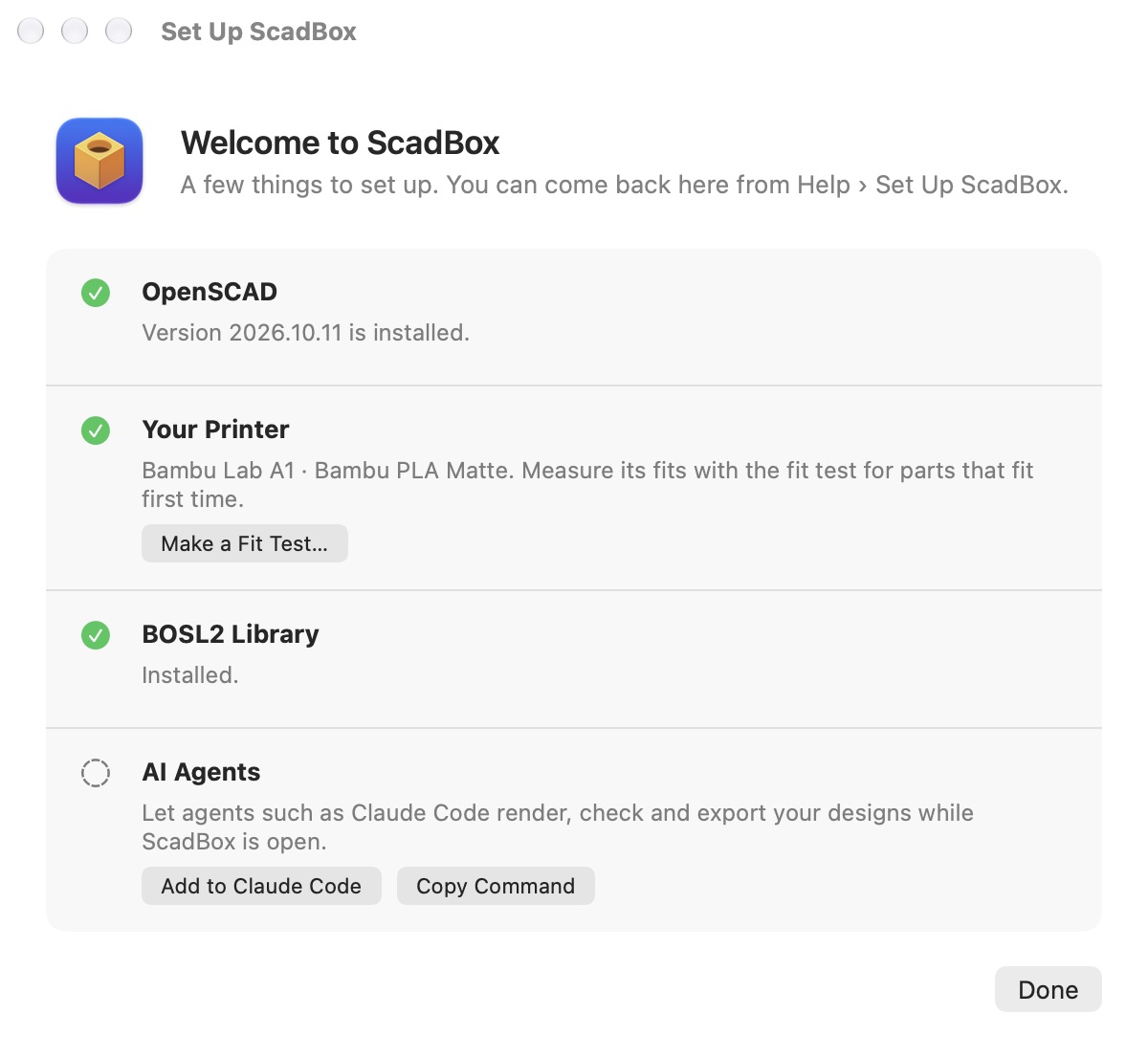
The Set Up ScadBox window, shown the first time you open ScadBox and later from Help › Set Up ScadBox…, has the same OpenSCAD step alongside the printer profile, the BOSL2 library and connecting an AI agent.
Where ScadBox looks for OpenSCAD
ScadBox checks these places, in order, and uses the first OpenSCAD it finds:
/Applications/OpenSCAD.appand/Applications/OpenSCAD-nightly.app- the same two names in
~/Applications - Homebrew's folders,
/opt/homebrew/bin/openscadand/usr/local/bin/openscad, then the rest of yourPATH
To use a different copy, open Settings (⌘,) › General and choose it under OpenSCAD › Location. The same section shows the version ScadBox found and its path, which is the quickest way to check what you're running.
Check it works
Open a new ScadBox document and type:
cube([20, 20, 10]);
translate([10, 10, 10]) sphere(d = 12, $fn = 48);
After a short pause the 3D view shows a block with a dome on top. If the console (⇧⌘Y) shows errors instead, check the version in Settings › General.
Requirements
ScadBox needs macOS 15 or later on an Apple silicon Mac. OpenSCAD itself is free and open source, and you can still open it on its own alongside ScadBox.
Questions
- Is OpenSCAD free on Mac?
- Yes. OpenSCAD is free and open source software. You can install it with Homebrew or download it from openscad.org.
- Should I install OpenSCAD 2021.01 or a development snapshot?
- A development snapshot. 2021.01 is the last numbered release but it is several years old. ScadBox needs version 2024.01 or newer, which only the snapshots provide.
- What is the Homebrew command to install OpenSCAD?
- brew install --cask openscad@snapshot installs the current development snapshot. brew upgrade --cask openscad@snapshot updates it.
- Why doesn't ScadBox include OpenSCAD?
- ScadBox runs OpenSCAD as a separate program rather than bundling it, so OpenSCAD is installed and updated on its own. If it's missing, ScadBox's setup card opens the download page, or lets you choose where OpenSCAD is.
- How does ScadBox find OpenSCAD?
- It looks in /Applications and ~/Applications for OpenSCAD.app or OpenSCAD-nightly.app, then in Homebrew's folders. You can choose a different copy in Settings › General › OpenSCAD › Location.