How to make a parametric OpenSCAD model with customizer sliders
Updated 19 November 2026
Put each dimension in a top-level variable with a literal value, write a description comment on the line above it, and add a range comment after it: width = 60; // [20:1:200] becomes a slider from 20 to 200 in steps of 1. Group variables under /* [Group name] */ headings and put derived values under /* [Hidden] */. OpenSCAD's Customizer and ScadBox's customizer both build their controls from these comments.
The comment syntax
OpenSCAD reads customizer parameters from top-level assignments at the start of the file. The comment on the line above is the description, and a comment in square brackets after the value sets the control:
// [20:1:200]: a slider from 20 to 200 in steps of 1 ([min:step:max]).// [20:200]: a slider from 20 to 200.// [square, round, hex]: a list of choices, for strings or numbers.// [1:Small, 2:Medium, 3:Large]: choices with labels; the number is what the design gets.trueorfalsewith no comment: a checkbox or switch.- A string with no comment: a text field.
Only values written as literals become parameters. outer_w = inner_w + 2 * wall; is an expression, so it never shows up, which is what you want for derived sizes. Keep parameters together at the top, before your modules.
A complete example
A desk tray with compartments. Every number that shapes it is a parameter, grouped into tabs:
// A desk tray with compartments. Prints open side up, no supports.

/* [Size] */
// Inside length of the tray
inner_w = 120;      // [40:1:250]
// Inside depth of the tray
inner_d = 80;       // [30:1:200]
// Height of the walls
wall_h = 25;        // [10:1:80]
// Radius of the outside corners
corner_r = 4;       // [0:0.5:10]

/* [Walls] */
// Wall and floor thickness
wall = 1.6;         // [0.8:0.4:4]
// Number of compartments
compartments = 3;   // [1:One, 2:Two, 3:Three, 4:Four]
// Make the dividers lower than the walls, for fingers
low_dividers = true;

/* [Colour] */
// Colour of the tray
tray_color = "#3A7BD5";

/* [Hidden] */
outer_w = inner_w + 2 * wall;
outer_d = inner_d + 2 * wall;
divider_h = low_dividers ? wall_h * 0.6 : wall_h;

// A rounded rectangle, extruded.
module rounded_block(w, d, h, r) {
    linear_extrude(h) offset(r = r) offset(delta = -r) square([w, d]);
}

module tray(w = inner_w, d = inner_d, h = wall_h, t = wall, n = compartments) {
    color(tray_color) {
        difference() {
            rounded_block(w + 2 * t, d + 2 * t, h, corner_r);
            translate([t, t, t]) cube([w, d, h]);
        }
        if (n > 1)
            for (i = [1 : n - 1])
                translate([t + i * w / n - t / 2, t, 0]) cube([t, d, divider_h]);
    }
}

tray();
echo(outer_size = [outer_w, outer_d, wall_h]);
Open it in OpenSCAD's Customizer or ScadBox and you get three tabs, Size, Walls and Colour, with sliders, a menu of compartment counts and a switch. outer_w and divider_h stay out of sight under Hidden.
How ScadBox shows parameters
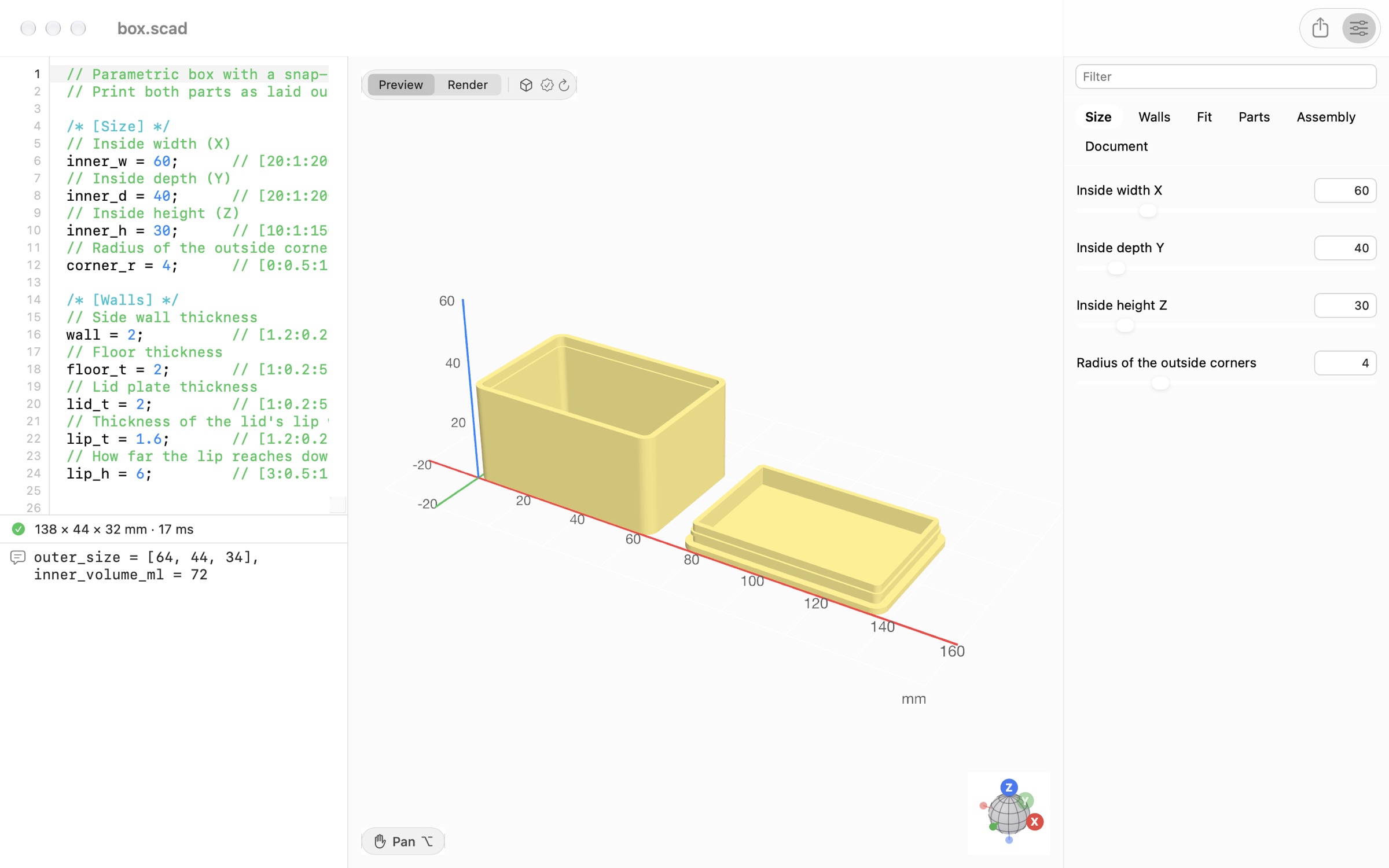
Show the customizer with View › Show Customizer (⌥⌘I). Each group is a tab, and View › Customizer Tabs jumps to one (⌥⌘1, ⌥⌘2 and so on). ScadBox turns the comments into controls that read like a Mac app:
- The description is the control's title. A short note in brackets at the end, as in
// Inside width (X), is shown beside it. - A variable without a description gets a readable title from its name:
inner_wbecomes "Inner width". - Two or three short choices are a segmented control; longer lists are a menu. Booleans are switches.
- A string holding a hex colour, like
tray_color = "#3A7BD5";, gets a colour picker. Don't add a one-item list comment to it, or it becomes a fixed choice.
Every change is written straight into the source, so the file always matches what you see, undo works, and a whole slider drag is one undo step. The first time you change a parameter, ScadBox records the file's original values in a comment at the end, so Design › Reset Parameters to Defaults can put them back; Design › Make Current Values the Defaults updates them.
Make every slider value work
A slider invites people to drag it to the end. If one size depends on another, derive it rather than letting the combination fail: a corner radius can be min(corner_r, inner_d / 2) instead of an assert() that stops the render. Use assert() only for what can't be derived, with a message naming the parameter to change.
Design › Check All Values… (⇧⌘K) renders each slider at its minimum and maximum, every option and every switch, and says which fail and where a slider starts failing. AI agents get the same check as the sweep tool.
Mark values you haven't measured
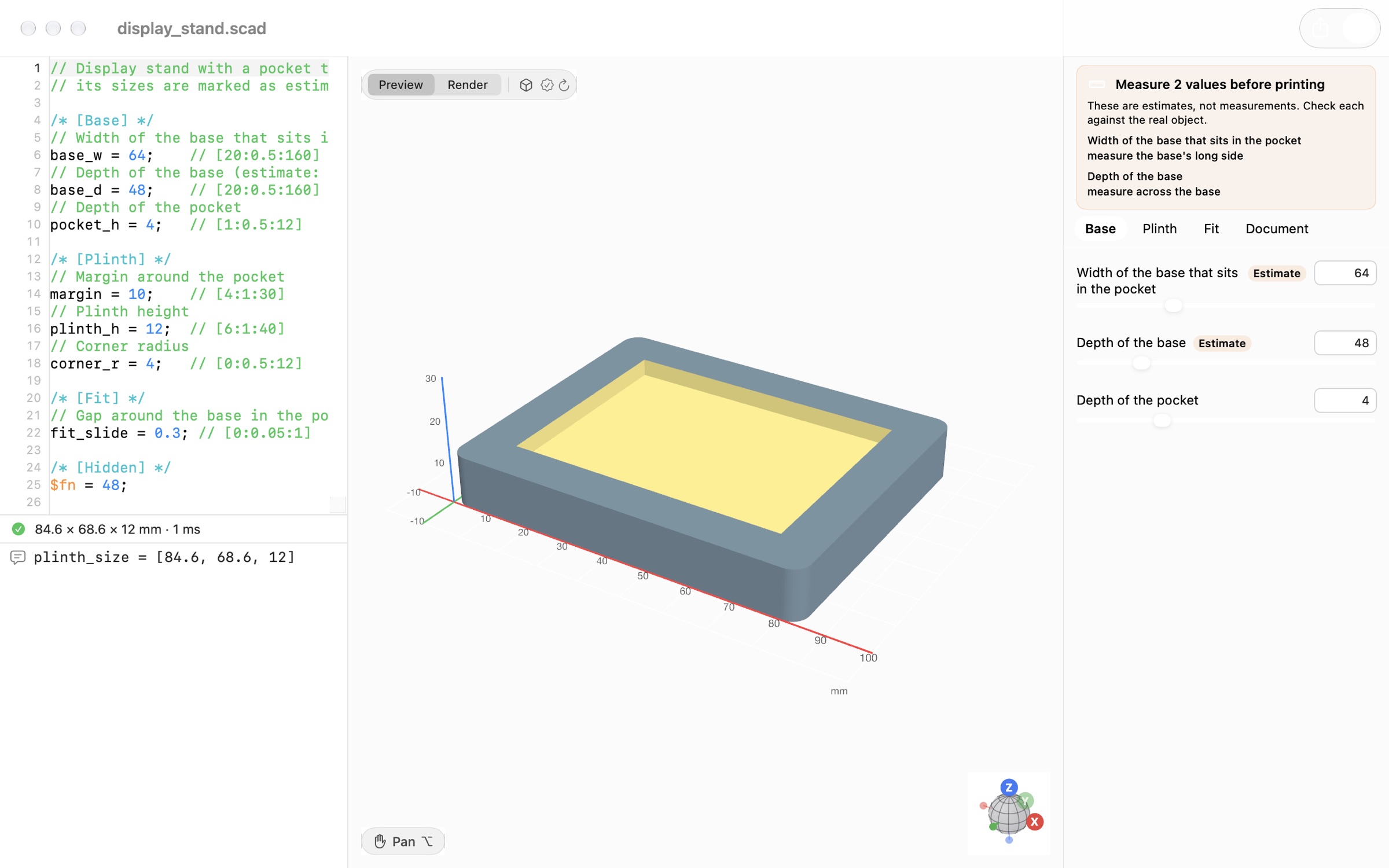
When a dimension is a guess, say so in its description with (estimate), or (estimate: what to measure):
// Width of the phone without its case (estimate: measure across the screen)
phone_w = 71.5;     // [50:0.5:100]
ScadBox shows an Estimate badge on that control and a banner above the parameters, such as "Measure 2 values before printing", listing each one with its note. Delete the marker once you've measured. This matters most when an AI agent wrote the design: it marks the sizes it assumed, so you know exactly which numbers to check before you print.
Naming and grouping tips
- Name by meaning, in millimetres:
wall,lid_h,screw_dia. Suffixes_w,_dand_hfor X, Y and Z sizes keep a big file readable. - Put clearances in their own Fit group with the standard names
fit_slide,fit_pressandfit_hole. See 3D print tolerances. - For a design with several parts, add
part = "all"; // [all, box, lid]so each part can be exported on its own.
Questions
- Do ScadBox's customizer comments work in OpenSCAD too?
- Yes. ScadBox reads the standard OpenSCAD customizer syntax, so the same file shows its parameters in OpenSCAD's own Customizer.
- Why doesn't my variable appear in the customizer?
- Only top-level assignments of literal values become parameters. A value calculated from other variables, a variable inside a module, or one under a /* [Hidden] */ heading isn't shown.
- How do I make a dropdown menu in the OpenSCAD customizer?
- Add a list of choices after the value, such as shape = "round"; // [square, round, hex]. For numbers with labels, use // [1:Small, 2:Medium, 3:Large].
- How do I hide a variable from the customizer?
- Put it after a /* [Hidden] */ heading. Everything below that heading is left out of the customizer, which is the place for derived sizes and constants like $fn.
- What does (estimate) do in a parameter description?
- It marks a value as a guess rather than a measurement. ScadBox shows an Estimate badge on it and lists it in a measure before printing banner. Remove it once the value is confirmed.